Data recovery services are becoming increasingly essential in our digital world, as we rely heavily on technology for storage. Whether it’s cherished memories, important documents, or critical business data, losing such information can lead to significant disruptions. Understanding the various types of data loss scenarios and their causes is crucial for anyone using digital devices.
The landscape of data recovery is diverse, encompassing different service types such as hard drive, SSD, and RAID recovery. Each of these services employs unique methodologies and technologies tailored to specific situations, making it important to know when to seek professional help.
Overview of Data Recovery Services
In today’s digital age, data is integral to both personal and professional activities. With the increasing reliance on technology, the need for data recovery services has never been more critical. These services help individuals and businesses retrieve lost data from various storage devices, ensuring that invaluable information remains accessible despite unforeseen circumstances.Data loss can occur due to a multitude of scenarios, each presenting unique challenges.
Understanding the types of data loss is essential for determining the appropriate recovery solutions. Common data loss situations include accidental deletion, hardware failures, software corruption, and even natural disasters. Each of these scenarios can have severe implications, such as disrupted workflows, financial losses, and compromised security.
Types of Data Loss Scenarios
Data loss scenarios can be categorized into various types, each with distinct characteristics and recovery requirements. The most prevalent categories include:
- Accidental Deletion: This occurs when files or data are unintentionally removed by users. Such incidents often happen due to simple mistakes, like misclicks or confusion in file management.
- Hardware Failures: Physical damage to storage devices, such as hard drives or SSDs, can lead to data inaccessibility. Failures can stem from mechanical issues, overheating, or manufacturing defects.
- Software Corruption: Data can become corrupt due to improper shutdowns, software bugs, or malware attacks. This can render files unreadable and often requires specialized recovery techniques.
- Naturally Occurring Disasters: Events such as floods, fires, or earthquakes can physically damage data storage environments, leading to significant data loss and requiring comprehensive recovery strategies.
Understanding the causes of data loss is equally important as it helps in prevention strategies. Some common causes include:
- Human Error: Simple mistakes can lead to significant data loss, highlighting the need for user training and awareness.
- Malware and Viruses: Malicious software can infect systems, corrupt files, or steal data, necessitating robust cybersecurity measures.
- Physical Damage: Accidental drops or exposure to harsh environments can damage storage devices, underscoring the importance of proper handling and storage.
- Software Issues: Bugs and compatibility problems can cause unexpected failures, emphasizing the need for regular software updates and maintenance.
“Data recovery is not just about retrieving lost information; it’s about restoring peace of mind.”
Types of Data Recovery Services
Data recovery services encompass a variety of specialized techniques tailored to retrieve lost data from different storage mediums. Understanding these service types is crucial for selecting the right approach for your data loss situation. Each type of service is designed to address specific scenarios and technologies, ensuring that recovery efforts are both efficient and effective.
Hard Drive Recovery
Hard drive recovery focuses on retrieving data from traditional spinning hard drives, commonly known as HDDs. When an HDD fails, it can be due to mechanical issues, logical failures, or physical damage. The recovery process typically involves the following methodologies:
- Logical Recovery: This approach is used when the drive is operational but data has been accidentally deleted or the file system is corrupted. Recovery software scans the drive to rebuild the directory structure and recover lost files.
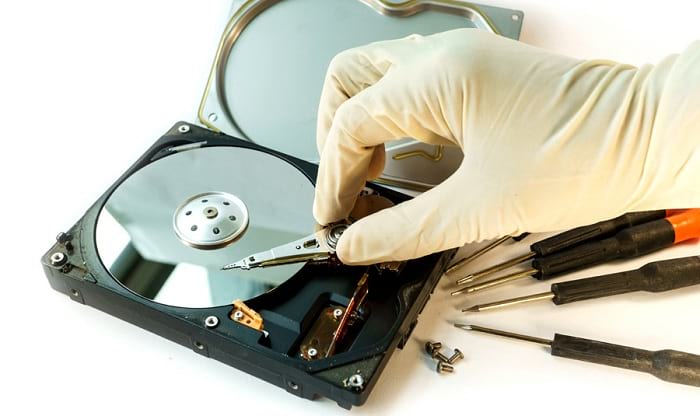
- Mechanical Recovery: In cases of physical damage, such as a head crash or motor failure, the hard drive is opened in a cleanroom environment. Expert technicians replace damaged components or transfer platters to a functional drive for data retrieval.
- Firmware Recovery: If the hard drive’s firmware is corrupted, specialized tools are used to rewrite or restore the firmware, which can help in accessing the data stored on the drive.
A typical scenario for hard drive recovery might involve a user accidentally formatting their drive, leading to the need for logical recovery methods. Alternatively, a hard drive that has suffered physical damage from a fall would necessitate mechanical recovery.
SSD Recovery
Solid State Drives (SSDs) utilize flash memory and have distinct recovery challenges compared to traditional hard drives. Their architecture means that data recovery requires specialized techniques:
- TRIM and Data Permanence: SSDs often use TRIM commands to optimize performance by erasing unused data blocks. Once data is TRIMmed, recovery becomes highly complex and sometimes impossible, necessitating preventive measures before data loss occurs.
- Firmware Issues: Recovery might involve updating or replacing the firmware of the SSD, which can restore functionality and access to stored data.
- Professional Data Recovery Tools: Specialized software designed for SSDs is employed to recover data that is still accessible but not readily retrievable through standard means.
A common situation requiring SSD recovery services involves a sudden power loss that corrupts the firmware, making data inaccessible but retrievable through expert intervention.
RAID Recovery
RAID (Redundant Array of Independent Disks) systems combine multiple hard drives for redundancy and performance. Data recovery in RAID setups can be intricate due to the complexity of the system:
- Logical RAID Recovery: If one or multiple drives fail, logical recovery methods can be employed to rebuild the RAID configuration and restore lost data, assuming that the remaining drives are functional.
- Physical RAID Recovery: In cases of multiple disk failures or severe physical damage, a professional recovery service will often disassemble the RAID setup in a cleanroom to access the individual drives and recover data.
- RAID Reconfiguration: Sometimes, data might be misconfigured due to user error or software issues, requiring reconfiguration and restoration from backups.
An example of RAID recovery is when a server experiences a catastrophic failure due to simultaneous drive outages, leading to the necessity for both logical and physical recovery techniques to restore critical business data.
Data Recovery Process
The data recovery process involves a systematic approach to retrieving lost, corrupted, or inaccessible data from various storage devices. This process is essential for individuals and businesses alike, as it can mean the difference between a minor inconvenience and a major disruption. Understanding the steps involved in professional data recovery, along with the tools and technologies that facilitate this process, is crucial for effective data retrieval.
Step-by-Step Data Recovery Process
The data recovery process typically involves several key steps to ensure successful retrieval of lost information. Each step is designed to identify the issue, evaluate the damage, and systematically recover the needed data. Here’s a breakdown of the standard procedure:
- Assessment: The initial step involves evaluating the storage device to determine the cause of data loss, whether it’s due to physical damage, logical failure, or human error.
- Diagnosis: Technicians perform diagnostic tests to identify the extent of the damage. This includes inspecting the physical condition and running software tools to analyze the file system.
- Creating a Disk Image: A sector-by-sector copy of the damaged disk is created to prevent further data loss during the recovery attempts. This ensures that the original data remains intact.
- Data Recovery: Using specialized tools and techniques, data is extracted from the disk image. This may involve file carving, rebuilding file systems, or using specific recovery algorithms for damaged files.
- Data Integrity Check: Recovered data is checked for integrity and completeness to ensure the files are usable and uncorrupted.
- Finalization: Once recovery is successful, the data is transferred to a secure location, and the client is provided with a report detailing the recovery process and results.
Tools and Technologies in Data Recovery
A variety of advanced tools and technologies are employed in the data recovery process to enhance efficiency and effectiveness. Understanding these tools is vital for anyone interested in the field of data recovery.The tools can be categorized into hardware and software:
- Hardware Tools: These include specialized devices such as clean room environments, which are vital for handling physically damaged drives. Additionally, imaging tools are crucial for creating exact copies of drives without risking further damage.
- Software Tools: Recovery software plays a significant role in retrieving lost files from logical failures. Tools like Disk Drill, EaseUS Data Recovery Wizard, and Stellar Data Recovery are commonly used for scanning, recovering, and restoring lost data.
Role of Software Versus Hardware in Recovery
In the data recovery process, both software and hardware play critical roles, each addressing different aspects of recovery challenges. Understanding the distinction between their functions clarifies their importance in successful data recovery.
Software is primarily utilized for logical recovery, while hardware is essential for physical recovery. Both are crucial for a comprehensive recovery strategy.
Hardware tools are indispensable when dealing with physical damage, such as broken platters or malfunctioning read/write heads. These tools often require specialized environments to prevent contamination and further damage during the recovery process. Conversely, software tools are designed to recover data from logically damaged or deleted files. They operate by scanning the disk for recoverable data and using algorithms to reconstruct files.
In many cases, effective recovery relies on a combination of both hardware and software, ensuring a higher success rate in retrieving lost data.
Choosing a Data Recovery Service Provider: Data Recovery Services
Selecting the right data recovery service provider is critical to ensure that your lost data is retrieved effectively and securely. With numerous options available, it’s essential to differentiate between providers based on key criteria that reflect their reliability, expertise, and overall capability.When considering a data recovery service, it is important to evaluate their offerings comprehensively. Factors such as cost, expertise, success rates, and customer service play pivotal roles in making an informed decision.
Here’s a detailed look at what to consider when choosing a provider.
Criteria for Selecting a Reliable Data Recovery Service Provider
The following criteria can help you assess potential data recovery service providers effectively. Each point has implications for the quality and reliability of the services they offer.
- Experience: Look for providers with a proven track record in the industry. The more experience they have, the better they are likely to handle complex data recovery situations.
- Certifications: Verify if the provider holds relevant certifications such as ISO 9001 or other industry-standard credentials that demonstrate their commitment to quality and professionalism.
- Success Rates: Investigate their historical success rates in recovering data. A high success rate often indicates reliability and expertise.
- Data Security Practices: Ensure they implement strong data protection measures to safeguard your sensitive information during recovery processes.
- Turnaround Time: Inquire about the timeframe for data recovery. Quick turnaround can be essential, especially for businesses.
- Customer Support: Reliable customer service is crucial. A responsive support team can provide peace of mind during the recovery process.
Comparison of Features Among Service Providers
Understanding the differences among various data recovery service providers can help you make a more informed decision. Below is a comparison based on cost, expertise, and success rates:
| Provider | Cost | Expertise | Success Rate |
|---|---|---|---|
| Provider A | Moderate ($500 – $800) | 10+ years in business | 85% |
| Provider B | High ($800 – $1200) | Specializes in RAID recovery | 90% |
| Provider C | Low ($300 – $500) | 5 years with good reviews | 70% |
This comparison indicates that while a higher price may correlate with greater expertise and success rates, it is important to weigh all factors, including your specific recovery needs and budget.
Checklist for Evaluating Potential Service Providers
Creating a checklist can streamline the evaluation process, ensuring that no critical factors are overlooked. Here’s a handy checklist for assessing data recovery service providers:
- Check reviews and testimonials from past clients.
- Inquire about the methods they use for data recovery.
- Confirm the availability of a free initial assessment.
- Understand their pricing structure, including any hidden fees.
- Assess their data privacy policies and compliance standards.
- Ensure they offer a no-recovery, no-fee guarantee.
- Evaluate the warranty or guarantees offered on data recovery services.
These elements are fundamental in determining the right provider for your data recovery needs. By utilizing this checklist, you can enhance your decision-making process and work towards recovering your lost data with confidence.
DIY Data Recovery Techniques

When faced with data loss, many individuals consider attempting to recover their lost files through do-it-yourself (DIY) methods. These approaches can be appealing as they often require minimal cost and can be executed quickly. However, it’s important to understand both the potential effectiveness and the risks associated with these techniques before diving in.DIY data recovery can encompass a variety of methods, ranging from simple software solutions to more complex hardware manipulations.
While some users may successfully recover their data, others may inadvertently cause further damage to the device or the data itself. Here’s an overview of some common DIY methods, the inherent risks involved, and tools that can assist in these recovery attempts.
Common DIY Data Recovery Methods
Several methods can be employed to recover lost data without professional help. Users typically start with less invasive techniques before moving on to more complex processes. Understanding these methods can empower users to handle data loss situations more confidently.
- Software Recovery Tools: Programs like Recuva, EaseUS Data Recovery Wizard, and Stellar Data Recovery are designed to scan storage devices for deleted files. These tools can restore files lost due to accidental deletion, formatting, or corruption.
- Check the Recycle Bin: Before anything else, users should check the Recycle Bin for deleted files. Recovery from this location is often straightforward and risk-free.
- File History or Backup Solutions: If users have previously set up backup solutions on their system, they can restore lost files easily. Windows File History or macOS Time Machine are examples of built-in options for data recovery.
- Using Command Prompt: For users comfortable with command-line tools, certain commands can be utilized to recover lost files. This method requires a basic understanding of commands and their functions.
Risks and Limitations of DIY Recovery
While DIY methods can be effective, there are notable risks and limitations to consider. Users must weigh the benefits against the potential for causing additional damage to their drives or losing data permanently.
- Data Overwriting: Continuing to use a storage device after data loss can lead to overwritten files, making recovery impossible.
- Inappropriate Tools: Utilizing improper recovery tools may cause further damage to the data or the storage device itself, complicating professional recovery efforts later.
- Incomplete Recovery: DIY methods may not fully recover all data, especially if the device has sustained significant physical damage or corruption.
- Lack of Expertise: Users without technical expertise may misinterpret the recovery process, leading to ineffective or harmful actions.
Tools for DIY Data Recovery
For those who decide to attempt data recovery themselves, a variety of tools are available to facilitate the process. These tools range from software applications to hardware devices that assist in recovering data.
- Recuva: A free software that offers a user-friendly interface for recovering deleted files from various storage devices.
- TestDisk: An open-source software tool that helps recover lost partitions and fix non-booting disks.
- PhotoRec: Works in conjunction with TestDisk, specifically aimed at recovering lost files from hard disks, memory cards, and digital cameras.
- Stellar Data Recovery: A comprehensive recovery software that supports various file types and storage devices, offering both free and paid versions.
- Disk Drill: Provides advanced scanning algorithms for recovering lost files, suitable for both novice and advanced users.
Preventative Measures for Data Loss
Data loss can be a significant concern for both individuals and organizations, leading to the potential for severe disruptions and data breaches. Implementing effective preventative measures is essential to safeguard against such occurrences. By understanding best practices for data backup, enhancing organizational strategies for data security, and establishing automated systems, you can greatly reduce the risk of losing critical information.
Best Practices for Data Backup
It is crucial to adopt robust data backup strategies to prevent loss of important information. Here are some best practices to consider:
- Implement the 3-2-1 backup rule: Maintain three copies of your data, on two different storage types, with one copy stored offsite.
- Regularly schedule backups: Set a routine for backups, whether daily, weekly, or monthly, depending on the volume of changes made to your data.
- Use reliable backup solutions: Invest in trustworthy software or services that offer automated backup processes for ease and efficiency.
- Test your backups: Regular testing ensures that your backup data is intact and can be restored when necessary.
Organizational Strategies for Data Security and Integrity
Enhancing data security and integrity within an organization involves strategic planning and implementation of security measures. Here are key approaches to strengthen your data security framework:
- Conduct regular security audits to identify vulnerabilities and update your security protocols accordingly.
- Establish access controls to limit data access only to authorized personnel, minimizing the risk of insider threats.
- Provide employee training on data handling and security practices to create a culture of awareness and responsibility regarding data protection.
- Utilize encryption for sensitive data both in transit and at rest to protect it from unauthorized access.
Setting Up Automated Backup Systems
Automating your backup processes can significantly reduce the risk of human error and ensure that your data is consistently protected. Below is a comprehensive guide on how to set up automated backup systems effectively:
- Select a backup software that fits your needs, ensuring it supports the types of data you want to protect.
- Configure the software to automatically back up data at regular intervals, choosing times when system usage is low to minimize disruptions.
- Choose storage locations carefully, utilizing cloud services in combination with local storage to ensure redundancy.
- Set notifications within the backup software to alert you of backup successes or failures, allowing for prompt action if issues arise.
“An ounce of prevention is worth a pound of cure.”
Benjamin Franklin
Legal and Ethical Considerations in Data Recovery
Data recovery services play a crucial role in retrieving lost or corrupted data. However, the process is fraught with legal and ethical considerations that must be carefully navigated. Understanding these implications is essential for both service providers and clients to ensure that data recovery is carried out responsibly and within the bounds of the law.The ethical implications of unauthorized data recovery efforts are significant.
Engaging in such practices can violate privacy rights and lead to severe consequences for individuals and organizations. Unauthorized access to data can result in reputational damage, legal action, and loss of trust from clients. Ethical practices in data recovery emphasize the importance of consent and transparency in handling sensitive information.
Legal Regulations Regarding Data Recovery Services
Data recovery services are governed by various laws and regulations that dictate how client data should be handled. These regulations are designed to protect sensitive information and ensure that data recovery is performed in a compliant manner. Important legal frameworks relevant to data recovery include data protection laws that require explicit consent from clients before their data can be accessed or recovered.The following points highlight key legal considerations for data recovery services:
- Data Protection Laws: Regulations such as the General Data Protection Regulation (GDPR) in the EU or the California Consumer Privacy Act (CCPA) set strict guidelines for handling personal data, including consent requirements and rights to data access and deletion.
- Client Confidentiality: Service providers must maintain confidentiality agreements to protect client data from unauthorized disclosure during the recovery process.
- Intellectual Property Rights: Data recovery efforts that involve proprietary or copyrighted materials can lead to legal disputes if proper permissions are not obtained.
- Compliance with Regulatory Bodies: Organizations in certain industries, such as healthcare and finance, are subject to additional regulations that govern data handling and recovery processes.
Examples of Legal Issues in Data Recovery
Instances of legal troubles arising from data recovery efforts underscore the necessity of adhering to legal regulations. For example, in 2017, a data recovery firm faced legal action after recovering data from a hard drive without proper authorization from the owner. This led to a lawsuit for invasion of privacy and unauthorized access.In another notable case, a company attempted to recover data from a device that belonged to a former employee who had left under contentious circumstances.
The recovery service was sued for breach of contract and violation of intellectual property rights, emphasizing the importance of having clear agreements in place.
“Respecting privacy and data ownership is essential not only for legal compliance but also for maintaining a trustworthy relationship with clients.”
Future Trends in Data Recovery Services
The landscape of data recovery services is continuously evolving, driven by advancements in technology and changing consumer expectations. As we look ahead, several trends are emerging that are set to reshape how data recovery is conducted, what services are offered, and how consumers approach data loss events. Understanding these trends is essential for both providers and consumers to navigate the future of data recovery effectively.Emerging technologies are significantly influencing data recovery services.
Innovations such as artificial intelligence (AI), machine learning, and cloud computing are playing pivotal roles in enhancing recovery capabilities. AI algorithms can analyze data patterns more efficiently, predicting potential failures and optimizing recovery processes. Cloud solutions allow users to back up their data in real-time, reducing the chances of loss and enabling quicker recovery. Moreover, advancements in storage technologies, such as solid-state drives (SSDs) and emerging memory technologies, are creating new challenges and opportunities for recovery services.
Emerging Technologies Impacting Data Recovery, Data recovery services
The following technologies are expected to have a substantial impact on data recovery services in the coming years:
- Artificial Intelligence and Machine Learning: AI and machine learning can improve data recovery processes through predictive analytics, allowing for proactive measures to prevent data loss.
- Cloud Storage Solutions: The growing reliance on cloud-based storage means that recovery services will need to adapt to various cloud platforms and their unique restoration processes.
- Blockchain Technology: Blockchain can enhance data integrity and security, making it easier to trace data origins and verify the authenticity of recovered files.
- Quantum Computing: As quantum computing develops, it could revolutionize data processing speed and recovery techniques, especially for complex data structures.
Consumer needs and preferences regarding data recovery are also evolving. Today’s consumers are increasingly aware of the importance of data security and the implications of data loss. They prefer solutions that not only recover lost data but also prevent future incidents. A heightened emphasis on data privacy and compliance is driving consumers to seek providers who adhere to stringent legal and ethical standards.
Changes in Consumer Needs and Preferences
As consumers become more informed about data recovery, their preferences are shifting towards:
- Comprehensive Services: Consumers are looking for one-stop solutions that encompass data recovery, backup, and preventive measures.
- Transparency: Clear communication regarding recovery processes, pricing, and expected outcomes is increasingly important to consumers.
- Rapid Response Times: With the urgency associated with data loss, consumers prefer providers who can offer quick turnaround times.
- Enhanced Security Measures: Assurance of data privacy and protection during the recovery process is a growing concern among consumers.
Looking toward the next decade, data recovery services will likely evolve significantly. The integration of advanced technologies, coupled with changing consumer expectations, will lead to more efficient and user-friendly solutions. Services may become more automated, allowing for quicker responses and minimizing human intervention, which can introduce errors. Additionally, a stronger emphasis on cybersecurity will drive data recovery providers to innovate in areas such as encryption and secure data handling.
Forecast for the Next Decade in Data Recovery Services
Over the next ten years, data recovery services are expected to undergo transformational changes. Key forecasts include:
- Increased Automation: Automation tools will streamline recovery processes, enabling faster and more reliable outcomes, thus reducing costs for both providers and consumers.
- Expansion of Remote Services: As remote work continues to rise, services that can efficiently recover data from remote devices will become increasingly important.
- Focus on Data Ethics: Ethical considerations regarding data handling and recovery will become a critical factor in consumer choice of service providers.
- Integration with IoT Devices: The proliferation of Internet of Things (IoT) devices will require specialized data recovery solutions tailored to handle diverse data types and storage methods.
FAQ Overview
What is data recovery?
Data recovery is the process of restoring lost data from damaged or corrupted storage devices.
How long does data recovery take?
The duration of data recovery can vary widely based on the type of damage and the amount of data, ranging from a few hours to several days.
Is data recovery always successful?
No, success rates depend on the extent of the damage and the methods used for recovery.
Can I recover data myself?
DIY recovery is possible for minor issues, but it carries risks and may lead to further data loss.
What should I do if I experience data loss?
Immediately stop using the device, and consult a professional data recovery service for the best chances of recovery.
